> ## Documentation Index
> Fetch the complete documentation index at: https://www.siya.com/llms.txt
> Use this file to discover all available pages before exploring further.
# Fuel Oil Monitor
> Comprehensive fuel oil management and analysis system with bunker sample testing, tank distribution monitoring, and fleet-wide quality compliance
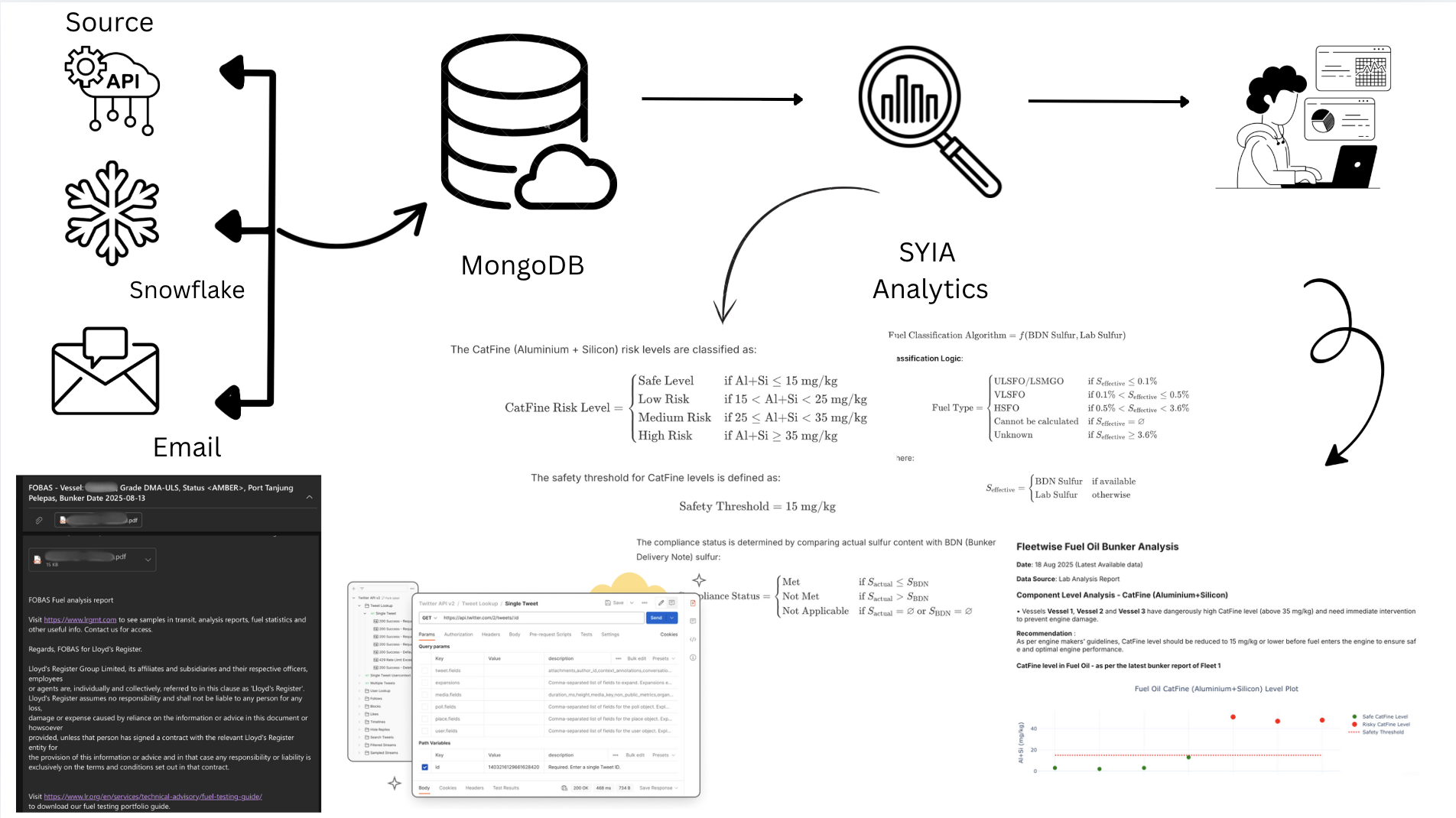 ## System Architecture & Data Flow
```mermaid theme={null}
graph TB
subgraph DS ["Data Sources"]
direction TB
A1["API Endpoints
Real-time Integration"]
A2["Email Systems
Attachment Processing"]
A3["Snowflake Database
Data Warehouse"]
end
subgraph LN ["Laboratory Network"]
direction TB
L1["Viswa Labs
API Integration"]
L2["Tribocare
API Integration"]
L3["FOBAS
API Integration"]
L4["VPS Marine
Snowflake Connection"]
L5["Bureau Veritas
Email with XML"]
L6["Maritec
Email with XML"]
end
subgraph PE ["Processing Engine"]
direction TB
P1["Data Extraction
Multi-source Parser"]
P2["XML File Processing
Email Attachments"]
P3["Data Validation
Quality Checks"]
P4["Data Transformation
Format Standardization"]
end
subgraph DL ["Database Layer"]
direction TB
D1["DataBase Clusters
Primary Storage"]
D2["Data Repository
Processed Records"]
end
L1 -->|"API Calls"| A1
L2 -->|"API Calls"| A1
L3 -->|"API Calls"| A1
L4 -->|"Database Query"| A3
L5 -->|"Email + XML"| A2
L6 -->|"Email + XML"| A2
A1 -->|"API Data"| P1
A2 -->|"XML Files"| P2
A3 -->|"VPS Data"| P1
P1 -->|"Extracted Data"| P3
P2 -->|"XML Data"| P3
P3 -->|"Validated Data"| P4
P4 -->|"Standardized Data"| D1
D1 -->|"Stored Data"| D2
classDef sourceNodes fill:#e3f2fd,stroke:#1565c0,stroke-width:3px,color:#000,font-weight:bold
classDef labNodes fill:#f3e5f5,stroke:#6a1b9a,stroke-width:3px,color:#000,font-weight:bold
classDef processNodes fill:#fff8e1,stroke:#ef6c00,stroke-width:3px,color:#000,font-weight:bold
classDef storageNodes fill:#e8f5e8,stroke:#2e7d32,stroke-width:3px,color:#000,font-weight:bold
class A1,A2,A3 sourceNodes
class L1,L2,L3,L4,L5,L6 labNodes
class P1,P2,P3,P4 processNodes
class D1,D2 storageNodes
```
## Laboratory Integration Network
Our module integrates with six leading marine fuel testing laboratories through different data channels:
| Laboratory | Integration Method | Data Format | Processing Type |
| ----------------------- | ------------------ | --------------- | ------------------- |
| **Viswa Labs** | API Integration | JSON | Real-time API calls |
| **Tribocare** | API Integration | JSON | Real-time API calls |
| **FOBAS** | API Integration | JSON | Real-time API calls |
| **VPS Marine** | Snowflake Database | Structured Data | Database queries |
| **Bureau Veritas (BV)** | Email Attachments | XML + Report | XML file extraction |
| **Maritec** | Email Attachments | XML + Report | XML file extraction |
## Process Workflow: Step-by-Step Implementation
### Phase 1: Data Acquisition & Integration
**Objective**: Establish comprehensive fuel oil data collection from multiple laboratory sources using different integration methods
#### Step 1: API-Based Data Collection
**The Challenge**: Traditional batch processing approaches failed to handle the dynamic nature of laboratory data updates, leading to data inconsistencies and processing gaps.
**Our Revolutionary Solution**: We engineered an intelligent cyclic data synchronization system that maintains perfect data integrity across all API-based laboratories.
```mermaid theme={null}
flowchart TD
A[Initial API Request
Historical Date Range] --> B[Data Processing
& Validation]
B --> C[Database Storage
with Timestamps]
C --> D[Query Latest Date
from Database]
D --> E[Calculate New Range
Latest Date → Current]
E --> F[API Request
Incremental Data]
F --> G[Process New Data
& Validate]
G --> H[Update Database
with New Records]
H --> I{More Data
Available?}
I -->|Yes| D
I -->|No| J[Cycle Complete
Await Next Run]
J --> D
classDef processNode fill:#e8f5e8,stroke:#2e7d32,stroke-width:2px,color:#000
classDef decisionNode fill:#fff3e0,stroke:#f57c00,stroke-width:2px,color:#000
classDef dataNode fill:#e3f2fd,stroke:#1565c0,stroke-width:2px,color:#000
class A,F processNode
class B,G processNode
class C,H dataNode
class D,E processNode
class I decisionNode
class J processNode
```
**Key Innovation**: This cyclic approach ensures zero data loss while optimizing API calls and maintaining real-time synchronization across all laboratory sources.
#### Step 2: Snowflake Database Integration
**Implementation**: VPS Marine Data Extraction
```mermaid theme={null}
flowchart LR
A[VPS Marine] --> B[Snowflake Database]
B --> C[Query Execution]
C --> D[Data Retrieval]
D --> E[MongoDB Storage]
```
**Snowflake Integration Features**:
* **Direct Database Connection**: Secure connection to VPS Snowflake instance
* **Scheduled Queries**: Automated data retrieval at regular intervals
* **Data Warehouse Access**: Access to historical and real-time VPS fuel analysis data
* **Query Optimization**: Efficient data extraction with minimal resource usage
#### Step 3: Email-Based Data Processing with XML Extraction
**Implementation**: BV and Maritec Laboratory Data
```mermaid theme={null}
flowchart TB
A[Email Systems] --> B[Email Monitor]
B --> C[Attachment Detection]
C --> D[File Extraction]
D --> E[XML File Processing]
D --> F[Report File Storage]
E --> G[Data Parsing]
G --> H[MongoDB Storage]
```
**Email Processing Workflow**:
* **Email Monitoring**: Continuous monitoring of designated email accounts
* **Attachment Identification**: Automatic detection of emails with attachments
* **Dual File Processing**:
* **XML File**: Contains structured data for extraction
* **Report File**: Actual laboratory report for reference
* **XML Data Extraction**: Automated parsing of XML files to extract fuel analysis data
* **Data Validation**: Verification of extracted data against laboratory standards
### Phase 2: Data Processing & Standardization
**Objective**: Process and standardize data from multiple sources into unified format
#### Step 4: Multi-Source Data Processing
⚡ API Data Processing
JSON parsing for real-time API data with advanced features:
-
✓
Dynamic Page Detection: Automatically reads total page count from API responses (Tribocare)
-
✓
Comprehensive Iteration: Systematically processes every page without data loss
-
✓
Memory-Efficient Accumulation: Optimally manages large datasets during collection
-
✓
Intelligent Job Discovery: Automatically identifies all relevant job IDs within specified date ranges (FOBAS)
-
✓
Automatic Token Refresh: Seamlessly handles token expiration with zero data loss
-
✓
Retry Logic: Implements exponential backoff for maximum reliability
-
✓
Parallel Processing: Optimizes throughput while respecting API rate limits
❄️ Snowflake Connector
Direct database connectivity for VPS data with enterprise-grade features:
-
✓
High-Performance Queries: Optimized SQL execution
-
✓
Secure Connections: Enterprise-level security protocols
-
✓
Automated Scheduling: Time-based data extraction
-
✓
Data Warehouse Integration: Seamless historical data access
📧 Email Parser
IMAP/POP3 protocols for email attachment processing:
-
✓
Real-time Monitoring: Continuous email surveillance
-
✓
Smart Filtering: Intelligent attachment detection
-
✓
Multi-account Support: Simultaneous email monitoring
-
✓
Secure Processing: Encrypted email handling
📄 XML Parser
Advanced XML processing for BV and Maritec data:
-
✓
Schema Validation: XML structure verification
-
✓
Data Extraction: Intelligent content parsing
-
✓
Error Handling: Robust exception management
-
✓
Format Standardization: Unified data output
#### Step 5: Data Validation & Quality Assurance
**Validation Framework**:
* **Schema Validation**: Ensuring data conforms to expected structure
* **Data Type Verification**: Confirming correct data types for all fields
* **Range Checking**: Validating fuel parameters are within acceptable ranges
* **Duplicate Detection**: Identifying and handling duplicate test results
* **Missing Data Handling**: Managing incomplete or missing data points
**Fuel Classification Algorithm**: Advanced fuel classification system that handles all edge cases and data variations with mathematical precision:
$\text{Fuel Classification Algorithm} = f(\text{BDN Sulfur}, \text{Lab Sulfur})$
**Classification Logic**:
$$
\text{Fuel Type} =
\begin{cases}
\text{ULSFO/LSMGO} & \text{if } S_{\text{effective}} \leq 0.1\% \\
\text{VLSFO} & \text{if } 0.1\% < S_{\text{effective}} \leq 0.5\% \\
\text{HSFO} & \text{if } 0.5\% < S_{\text{effective}} < 3.6\% \\
\text{Cannot\ be\ calculated} & \text{if } S_{\text{effective}} = \varnothing \\
\text{Unknown} & \text{if } S_{\text{effective}} \geq 3.6\%
\end{cases}
$$
Where:
$$
S_{\text{effective}} =
\begin{cases}
\text{BDN Sulfur} & \text{if available} \\
\text{Lab Sulfur} & \text{otherwise}
\end{cases}
$$
#### Step 6: Data Transformation & Standardization
**Transformation Process**:
* **Unit Standardization**: Converting all measurements to standard units
* **Field Mapping**: Mapping laboratory-specific fields to unified schema
* **Data Enrichment**: Adding metadata and processing timestamps
### Phase 3: Database Storage & Management
**Objective**: Efficiently store processed data in MongoDB with proper indexing and organization
#### Step 7: MongoDB Storage Architecture
```mermaid theme={null}
graph TB
subgraph "MongoDB Collections"
A[Raw Data Collection]
B[Processed Data Collection]
C[Laboratory Metadata]
D[Processing Logs]
end
subgraph "Data Organization"
E[Vessel-based Indexing]
F[Date-based Partitioning]
G[Laboratory Source Tagging]
end
A --> B
B --> E
B --> F
B --> G
```
**Storage Features**:
* **Indexing Strategy**: Optimized indexes for fast query performance
* **Data Partitioning**: Efficient data organization by vessel and date
* **Backup & Recovery**: Automated backup and disaster recovery procedures
#### Step 8: Data Repository Management
**Repository Features**:
* **Version Control**: Tracking data changes and updates
* **Audit Trail**: Complete logging of all data processing activities
* **Data Lineage**: Tracing data from source to final storage
### Phase 4: Advanced Analytics & Risk Assessment
**Objective**: Implement sophisticated fuel analysis algorithms for risk assessment and compliance monitoring
#### Step 9: CatFine (Aluminium + Silicon) Risk Categorization System
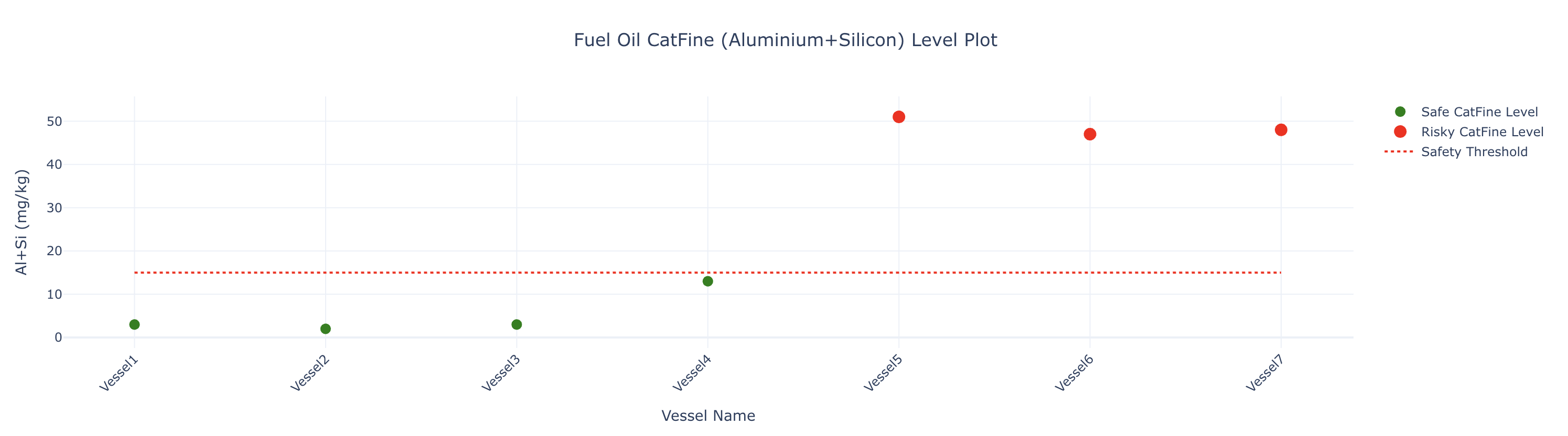
**Implementation Strategy**: Our advanced CatFine analysis system extracts concentration data from the latest bunkering operations and applies multi-tier risk assessment protocols.
**Primary Safety Threshold**: A critical threshold of **15 mg/kg** is implemented as the primary safety benchmark:
$$
\text{Primary Risk Assessment} =
\begin{cases}
\text{Safe Level} & \text{if } \text{CatFine} \leq 15 \ \text{mg/kg} \\
\text{Risky Level} & \text{if } \text{CatFine} > 15 \ \text{mg/kg}
\end{cases}
$$
**Enhanced Multi-Tier Risk Classification**: Our system implements three sophisticated risk bands for comprehensive vessel safety management:
$$
\text{Advanced Risk Categorization} =
\begin{cases}
\text{Safe Level} & \text{if } \text{CatFine} \leq 15 \ \text{mg/kg} \\
\text{Moderately Elevated} & \text{if } 15 < \text{CatFine} \leq 25 \ \text{mg/kg} \\
\text{Elevated Risk} & \text{if } 25 < \text{CatFine} \leq 35 \ \text{mg/kg} \\
\text{Dangerously High} & \text{if } \text{CatFine} > 35 \ \text{mg/kg}
\end{cases}
$$
**Risk Level Descriptions**:
* **Safe Level (≤ 15 mg/kg)**: Vessel operates within optimal safety parameters
* **Moderately Elevated (15-25 mg/kg)**: Minimal risk profile with recommended monitoring protocols
* **Elevated Risk (25-35 mg/kg)**: Requires close monitoring and enhanced fuel treatment procedures
* **Dangerously High (> 35 mg/kg)**: Critical status requiring immediate intervention and emergency protocols
#### Step 10: Sulfur Compliance Verification System
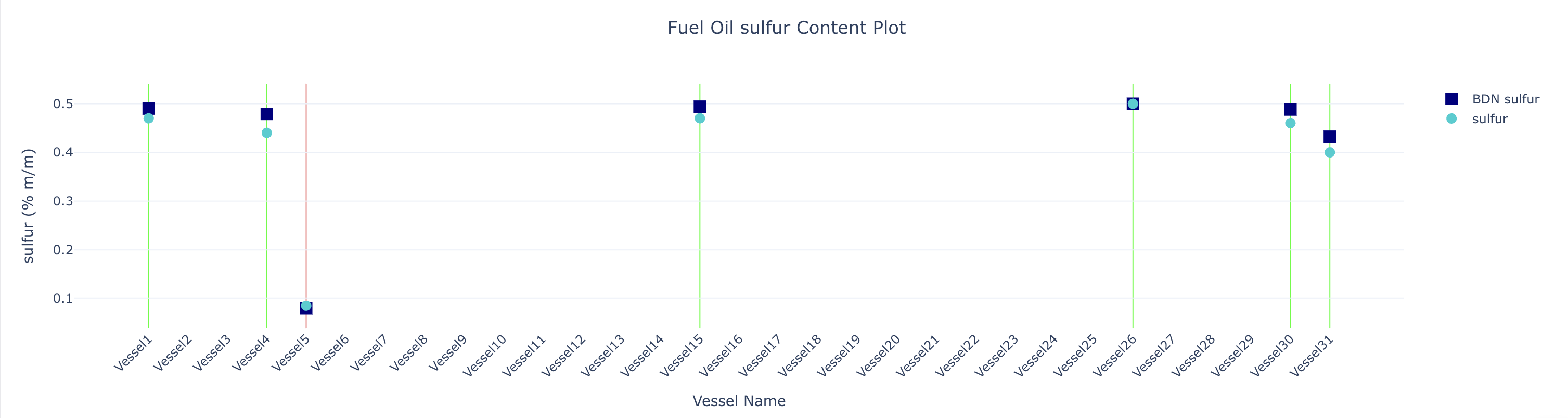
**Compliance Algorithm**: Our intelligent compliance system performs real-time comparison between laboratory-tested sulfur values and Bunker Delivery Note (BDN) specifications for each vessel in the fleet.
$$
\text{Sulfur Compliance Status} =
\begin{cases}
\text{Compliant} & \text{if } S_{\text{tested}} \leq S_{\text{BDN}} \\
\text{Non-Compliant} & \text{if } S_{\text{tested}} > S_{\text{BDN}} \\
\text{Not Applicable} & \text{if } S_{\text{tested}} = \varnothing \ \text{or } S_{\text{BDN}} = \varnothing
\end{cases}
$$
**Fleet-Level Compliance Assessment**: The system generates comprehensive fleet-wide compliance reports:
* **Individual Vessel Analysis**: Detailed compliance status for each vessel
* **Non-Compliant Vessel Identification**: Automatic flagging and listing of vessels exceeding BDN limits
* **Fleet Compliance Summary**: Overall fleet status with full compliance verification
#### Step 11: Advanced Visualization & Interactive Analytics
**Dual-Plot Visualization System**: Our module generates two sophisticated interactive plots using Plotly for comprehensive fuel analysis visualization:
**CatFine Risk Visualization**:
 **Sulfur Compliance Visualization**:
 **Visualization Features**:
* **Interactive Interface**: Real-time data exploration with zoom and filter capabilities
* **Multi-Parameter Display**: Simultaneous visualization of BDN and tested values
* **Compliance Indicators**: Visual compliance status with color-coded vertical lines
* **Threshold Markers**: Clear safety threshold indicators for immediate risk assessment
**Visualization Features**:
* **Interactive Interface**: Real-time data exploration with zoom and filter capabilities
* **Multi-Parameter Display**: Simultaneous visualization of BDN and tested values
* **Compliance Indicators**: Visual compliance status with color-coded vertical lines
* **Threshold Markers**: Clear safety threshold indicators for immediate risk assessment