> ## Documentation Index
> Fetch the complete documentation index at: https://www.siya.com/llms.txt
> Use this file to discover all available pages before exploring further.
# Introduction to Siya
> Understand Siya's revolutionary dual-mode AI architecture and capabilities
Siya represents a breakthrough in AI technology, featuring an adaptive multi-agent system that changes its architecture based on how you choose to work. Whether you prefer interactive collaboration or autonomous execution, Siya adjusts to deliver optimal results.
## Why Siya?
Modern tasks require diverse expertise and approaches. Traditional AI assistants often struggle with complex, multi-faceted challenges that span different domains.
Siya solves this with two distinct execution modes that ensure you always have the right approach for your needs.
## Dual-Mode Architecture
Perfect for exploration, learning, and iterative development
Direct dialogue with Siya for real-time assistance
Immediate access to all available tools and capabilities
Create specialized agents on demand for specific tasks
See results as they happen with continuous updates
Chat Mode is ideal when you need to explore options, learn about a topic, or work iteratively on a solution.
Perfect for production work, complex projects, and automation
Set it and forget it - Siya handles everything
Coordinated agent teamwork for complex operations
Multi-step task breakdown and execution
Handle multiple operations efficiently
Task Mode excels at well-defined projects where you want Siya to work autonomously without constant interaction.
## System Architecture
### High-Level Overview
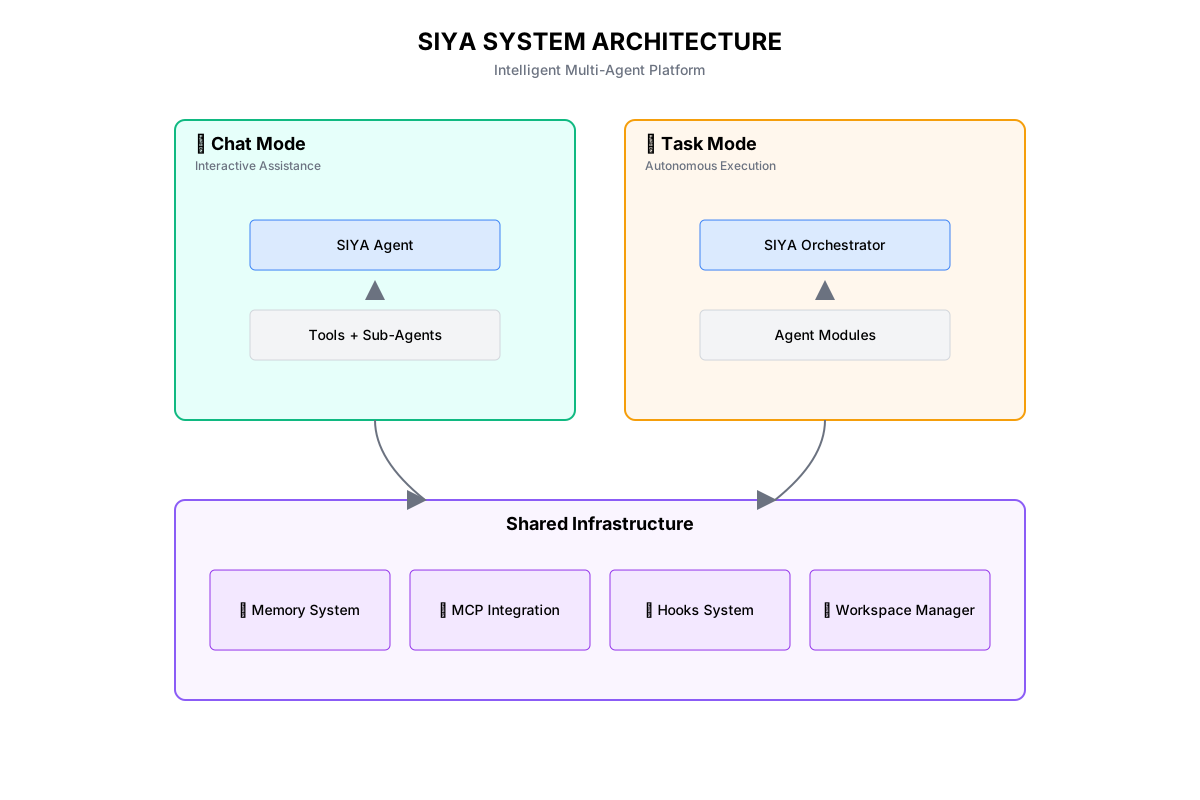 Both Chat Mode and Task Mode leverage the same powerful Shared Infrastructure, ensuring consistent performance and capabilities across all interaction patterns.
### Chat Mode Architecture
Both Chat Mode and Task Mode leverage the same powerful Shared Infrastructure, ensuring consistent performance and capabilities across all interaction patterns.
### Chat Mode Architecture
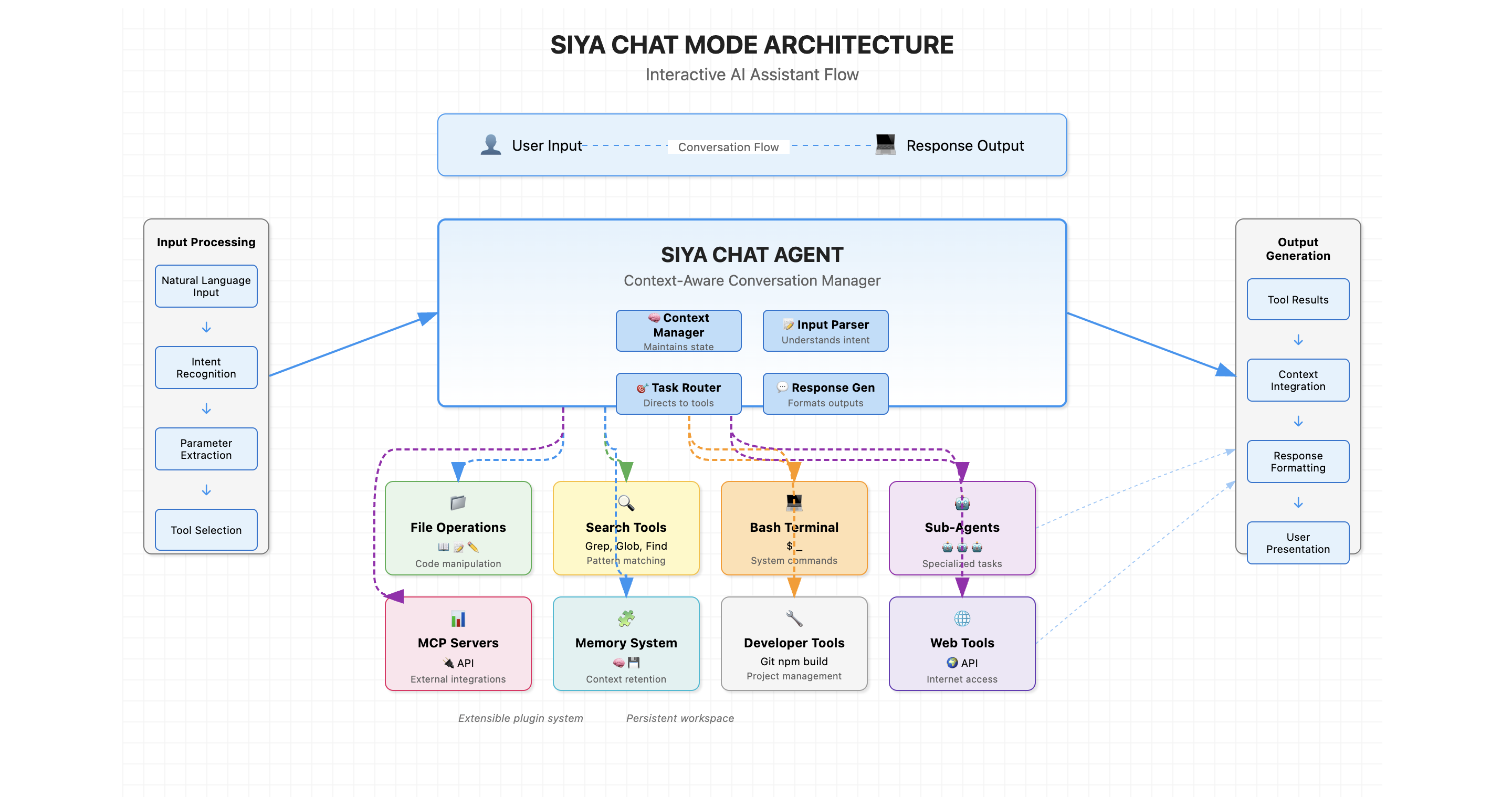 ### Task Mode Architecture
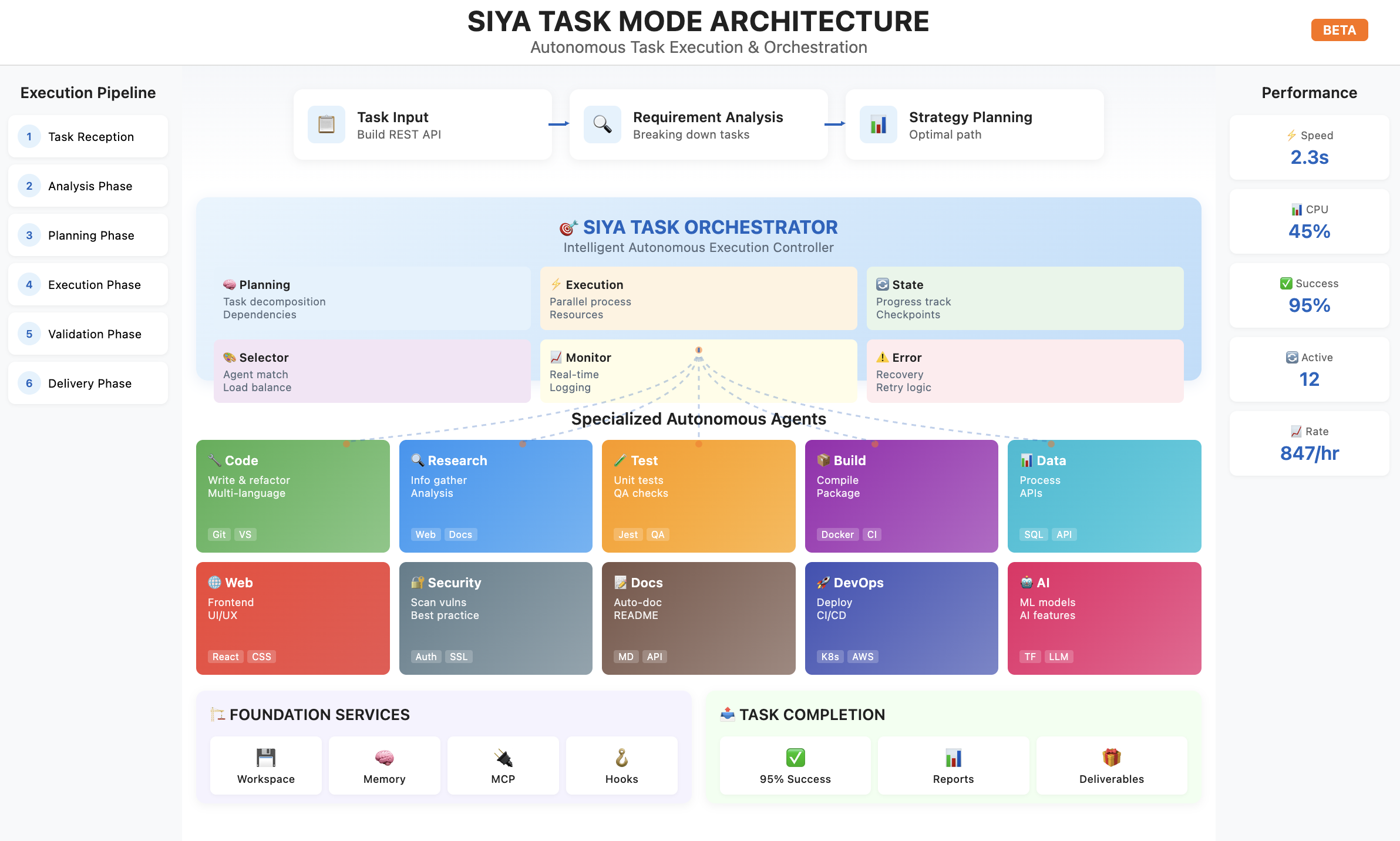 ## Key Capabilities
* **Code Generation**: Create entire applications, functions, or scripts
* **Code Review**: Analyze and improve existing codebases
* **Debugging**: Find and fix bugs systematically
* **Refactoring**: Optimize code structure and performance
* **Documentation**: Generate comprehensive technical docs
* **Data Processing**: Clean, transform, and analyze datasets
* **Visualization**: Create charts, graphs, and dashboards
* **Statistical Analysis**: Perform complex calculations
* **Report Generation**: Produce insights and summaries
* **Pattern Recognition**: Identify trends and anomalies
* **Web Scraping**: Extract data from websites
* **Browser Automation**: Interact with web applications
* **API Integration**: Connect to external services
* **Form Submission**: Automate data entry
* **Testing**: Perform end-to-end web testing
* **Task Scheduling**: Set up recurring operations
* **Workflow Automation**: Chain multiple operations
* **Monitoring**: Track system and application states
* **Notifications**: Alert on specific conditions
* **Batch Processing**: Handle large-scale operations
## Core Features
GPT-5, Claude 4, Gemini 2.5, and powerful local options
Extend capabilities with Model Context Protocol servers
Automate workflows with event-driven hooks
## Architecture Benefits
The dual-mode system adapts to your working style, providing the right level of autonomy for each task.
Parallel agent execution and efficient resource management handle projects of any size.
MCP servers, hooks, and plugin architecture allow unlimited customization.
Auto-compacting memory maintains relevant context without overwhelming the system.
## Design Principles
**Security First**
* Sandboxed execution
* Encrypted credentials
* Permission controls
**Performance Optimized**
* Parallel processing
* Smart caching
* Resource efficiency
**Modular Design**
* Loosely coupled components
* Plugin-ready architecture
* Easy maintenance
**User-Centric**
* Intuitive interface
* Clear feedback
* Customizable workflows
## Getting Started
Get the Siya macOS app
Simple drag-and-drop installation
Select Chat or Task mode
Experience AI that adapts to you
Continue to the **[Quick Start Guide](/siya-superagent/quick-start)** →
Siya is continuously evolving with new features and capabilities. Join our community to stay updated on the latest developments!
***
*Siya - Adaptive AI that works the way you do.*
## Key Capabilities
* **Code Generation**: Create entire applications, functions, or scripts
* **Code Review**: Analyze and improve existing codebases
* **Debugging**: Find and fix bugs systematically
* **Refactoring**: Optimize code structure and performance
* **Documentation**: Generate comprehensive technical docs
* **Data Processing**: Clean, transform, and analyze datasets
* **Visualization**: Create charts, graphs, and dashboards
* **Statistical Analysis**: Perform complex calculations
* **Report Generation**: Produce insights and summaries
* **Pattern Recognition**: Identify trends and anomalies
* **Web Scraping**: Extract data from websites
* **Browser Automation**: Interact with web applications
* **API Integration**: Connect to external services
* **Form Submission**: Automate data entry
* **Testing**: Perform end-to-end web testing
* **Task Scheduling**: Set up recurring operations
* **Workflow Automation**: Chain multiple operations
* **Monitoring**: Track system and application states
* **Notifications**: Alert on specific conditions
* **Batch Processing**: Handle large-scale operations
## Core Features
GPT-5, Claude 4, Gemini 2.5, and powerful local options
Extend capabilities with Model Context Protocol servers
Automate workflows with event-driven hooks
## Architecture Benefits
The dual-mode system adapts to your working style, providing the right level of autonomy for each task.
Parallel agent execution and efficient resource management handle projects of any size.
MCP servers, hooks, and plugin architecture allow unlimited customization.
Auto-compacting memory maintains relevant context without overwhelming the system.
## Design Principles
**Security First**
* Sandboxed execution
* Encrypted credentials
* Permission controls
**Performance Optimized**
* Parallel processing
* Smart caching
* Resource efficiency
**Modular Design**
* Loosely coupled components
* Plugin-ready architecture
* Easy maintenance
**User-Centric**
* Intuitive interface
* Clear feedback
* Customizable workflows
## Getting Started
Get the Siya macOS app
Simple drag-and-drop installation
Select Chat or Task mode
Experience AI that adapts to you
Continue to the **[Quick Start Guide](/siya-superagent/quick-start)** →
Siya is continuously evolving with new features and capabilities. Join our community to stay updated on the latest developments!
***
*Siya - Adaptive AI that works the way you do.*