> ## Documentation Index
> Fetch the complete documentation index at: https://www.siya.com/llms.txt
> Use this file to discover all available pages before exploring further.
# Automated UI Testing
## 1. Overview
This document provides a comprehensive technical specification for our automated UI testing. The system's intelligence is centered around the **SIYA Agent**, which orchestrates the entire testing process by communicating with a **Model Context Protocol (MCP) Server**. This server provides a suite of specialized tools that handle the low-level tasks of browser automation and database interaction.
The workflow is designed for daily execution, ensuring the continuous integrity and functional correctness of our application's user interface. By delegating complex actions to the MCP server, the agent can focus on the high-level tasks of test orchestration, visual analysis, and intelligent reporting. This architecture represents a paradigm shift from traditional, script-based automation to a more dynamic, resilient, and intelligent model for quality assurance.
***
## 2. System Architecture
As illustrated in the workflow diagram, the system is composed of the SIYA Agent, the MCP Server, and the external resources the server interacts with.
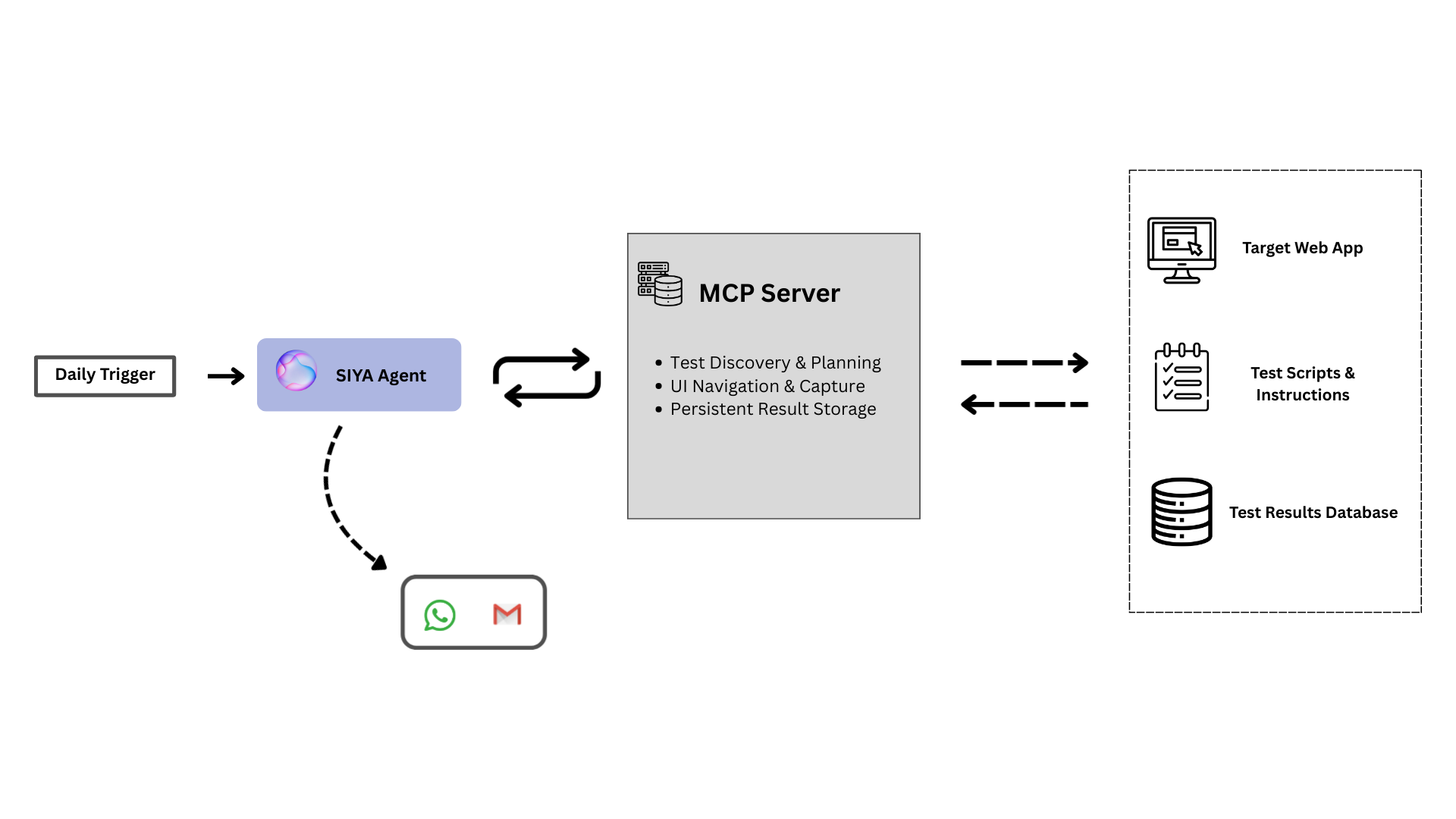 * **Daily Trigger:** A scheduled event that initiates the entire testing process by activating the SIYA Agent.
* **SIYA Agent:** The orchestrator of the workflow. It is an autonomous agent that makes decisions and directs the testing process by making calls to the MCP Server.
* **MCP Server:** The intermediary component that exposes a clear API for the agent. It contains the logic to execute the agent's commands. It interacts with three key resources:
* **Application Under Test:** The live web application UI that is the target of the tests. The MCP Server launches a browser to navigate and capture screenshots of this application.
* **Test Scripts & Instructions:** A dedicated database collection that stores the test definitions, including navigation scripts and the detailed checking instructions for the agent.
* **Test Results Database:** A dedicated database collection where the final, detailed reports generated by the agent are stored for every test run.
***
## 3. The Daily Workflow: An Agent-Orchestrated Process
The entire process is initiated and managed by the SIYA Agent, which follows a logical sequence of tool calls to perform its duties.
The agent calls a server tool to get a complete inventory of all defined UI tests, allowing it to plan the execution run.
For each test, the agent uses a tool to execute the corresponding navigation script. The server interacts with the live application and returns the captured screenshot, reference image, and checking instructions.
With the images and instructions, the agent performs its core task: a detailed, context-aware comparison to check for visual and functional correctness.
Based on its analysis, the agent constructs a detailed report object according to the defined structure, including a `pass`/`fail` status, confidence score, summary, and a list of any discovered issues.
The agent calls a server tool, passing the report object. The MCP server then saves this report as a new document in the Test Results Database.
If a test fails, the agent automatically constructs and sends a notification via **Email** and **WhatsApp** to the responsible team, including a summary and a link to the full report.
***
## 4. Test Report Structure
The report object generated by the agent is a structured document designed for both human readability and machine processing. It is composed of the following key components:
Contains the core pass/fail metrics. Includes the boolean `match` field, the AI's `confidence` score, and the final `test_status`.
Provides human-readable details. Includes the natural language `summary`, a list of `differences`, and any `critical_issues`.
Includes `metadata` for tracking and a `recommendation` for the next steps, which drives the automated alerting process.
***
## 5. MCP Server Capabilities
The agent's capabilities are defined by the tools exposed by the MCP server. These tools empower the agent to manage the entire testing lifecycle.
Dynamically queries the test repository to retrieve a complete inventory of available UI tests, their scripts, and specific checking instructions.
Launches a browser to execute complex navigation scripts, interact with the live application, and capture high-fidelity visual snapshots for analysis.
Saves the detailed analysis, comparison results, and final verdict from the agent into a structured, long-term database for reporting and historical tracking.
***
## 6. Technical Merits
The use of an agentic AI model for UI testing represents a fundamental improvement over traditional, script-based automation. This approach addresses the inherent brittleness and high maintenance costs of legacy testing frameworks.
### Advantages of Agentic AI in UI Testing
* **Beyond Brittle Selectors: Dynamic Adaptation:** Traditional test scripts rely on fixed selectors (like CSS IDs or XPaths) and break whenever the UI is refactored. An AI agent, however, can identify elements based on context, appearance, and position. This makes the tests resilient to minor code changes, drastically reducing maintenance and false positives.
* **Semantic Understanding of the UI:** An agent doesn't just see a DOM tree; it can be trained to understand the *purpose* of UI components. It recognizes a "shopping cart," a "login button," or a "user profile icon" regardless of the underlying implementation. This allows for more robust tests that validate user journeys rather than just code structure.
* **Autonomous Navigation of Complex Scenarios:** Manually scripting every possible user path, including handling dynamic pop-ups, A/B test variations, and unexpected state changes, is prohibitively complex. An agent can be given a high-level goal (e.g., "add an item to the cart and proceed to checkout") and can autonomously navigate the UI to achieve it, adapting its path as needed.
* **Holistic, Human-like Analysis:** Traditional automation can confirm if an element exists, but it cannot easily judge visual coherence, layout consistency, or aesthetic quality. An AI agent can perform a more holistic, human-like analysis, flagging not just functional bugs but also visual regressions, awkward layouts, and inconsistencies that negatively impact the user experience.
***
## 7. Conclusion
The described workflow represents a significant advancement over traditional UI automation frameworks. The separation of concerns between the intelligent agent and the execution server provides a powerful, scalable, and maintainable foundation for ensuring application quality. This model not only automates testing but elevates it, enabling a more dynamic and context-aware approach to quality assurance.
* **Daily Trigger:** A scheduled event that initiates the entire testing process by activating the SIYA Agent.
* **SIYA Agent:** The orchestrator of the workflow. It is an autonomous agent that makes decisions and directs the testing process by making calls to the MCP Server.
* **MCP Server:** The intermediary component that exposes a clear API for the agent. It contains the logic to execute the agent's commands. It interacts with three key resources:
* **Application Under Test:** The live web application UI that is the target of the tests. The MCP Server launches a browser to navigate and capture screenshots of this application.
* **Test Scripts & Instructions:** A dedicated database collection that stores the test definitions, including navigation scripts and the detailed checking instructions for the agent.
* **Test Results Database:** A dedicated database collection where the final, detailed reports generated by the agent are stored for every test run.
***
## 3. The Daily Workflow: An Agent-Orchestrated Process
The entire process is initiated and managed by the SIYA Agent, which follows a logical sequence of tool calls to perform its duties.
The agent calls a server tool to get a complete inventory of all defined UI tests, allowing it to plan the execution run.
For each test, the agent uses a tool to execute the corresponding navigation script. The server interacts with the live application and returns the captured screenshot, reference image, and checking instructions.
With the images and instructions, the agent performs its core task: a detailed, context-aware comparison to check for visual and functional correctness.
Based on its analysis, the agent constructs a detailed report object according to the defined structure, including a `pass`/`fail` status, confidence score, summary, and a list of any discovered issues.
The agent calls a server tool, passing the report object. The MCP server then saves this report as a new document in the Test Results Database.
If a test fails, the agent automatically constructs and sends a notification via **Email** and **WhatsApp** to the responsible team, including a summary and a link to the full report.
***
## 4. Test Report Structure
The report object generated by the agent is a structured document designed for both human readability and machine processing. It is composed of the following key components:
Contains the core pass/fail metrics. Includes the boolean `match` field, the AI's `confidence` score, and the final `test_status`.
Provides human-readable details. Includes the natural language `summary`, a list of `differences`, and any `critical_issues`.
Includes `metadata` for tracking and a `recommendation` for the next steps, which drives the automated alerting process.
***
## 5. MCP Server Capabilities
The agent's capabilities are defined by the tools exposed by the MCP server. These tools empower the agent to manage the entire testing lifecycle.
Dynamically queries the test repository to retrieve a complete inventory of available UI tests, their scripts, and specific checking instructions.
Launches a browser to execute complex navigation scripts, interact with the live application, and capture high-fidelity visual snapshots for analysis.
Saves the detailed analysis, comparison results, and final verdict from the agent into a structured, long-term database for reporting and historical tracking.
***
## 6. Technical Merits
The use of an agentic AI model for UI testing represents a fundamental improvement over traditional, script-based automation. This approach addresses the inherent brittleness and high maintenance costs of legacy testing frameworks.
### Advantages of Agentic AI in UI Testing
* **Beyond Brittle Selectors: Dynamic Adaptation:** Traditional test scripts rely on fixed selectors (like CSS IDs or XPaths) and break whenever the UI is refactored. An AI agent, however, can identify elements based on context, appearance, and position. This makes the tests resilient to minor code changes, drastically reducing maintenance and false positives.
* **Semantic Understanding of the UI:** An agent doesn't just see a DOM tree; it can be trained to understand the *purpose* of UI components. It recognizes a "shopping cart," a "login button," or a "user profile icon" regardless of the underlying implementation. This allows for more robust tests that validate user journeys rather than just code structure.
* **Autonomous Navigation of Complex Scenarios:** Manually scripting every possible user path, including handling dynamic pop-ups, A/B test variations, and unexpected state changes, is prohibitively complex. An agent can be given a high-level goal (e.g., "add an item to the cart and proceed to checkout") and can autonomously navigate the UI to achieve it, adapting its path as needed.
* **Holistic, Human-like Analysis:** Traditional automation can confirm if an element exists, but it cannot easily judge visual coherence, layout consistency, or aesthetic quality. An AI agent can perform a more holistic, human-like analysis, flagging not just functional bugs but also visual regressions, awkward layouts, and inconsistencies that negatively impact the user experience.
***
## 7. Conclusion
The described workflow represents a significant advancement over traditional UI automation frameworks. The separation of concerns between the intelligent agent and the execution server provides a powerful, scalable, and maintainable foundation for ensuring application quality. This model not only automates testing but elevates it, enabling a more dynamic and context-aware approach to quality assurance.